Overview
Your account balance represents the total amount of funds currently held in your business account. KingsPay supports multiple currencies, so your balance is tracked separately for each currency your business account operates in. This means if your account holds funds in IDR, MYR, and USD for example, each currency will have its own independent balance.
Viewing your balances
You can view your current balances by navigating to the Balances page. The overview tab displays a card for each currency your business account holds, showing you the current state of your funds at a glance.
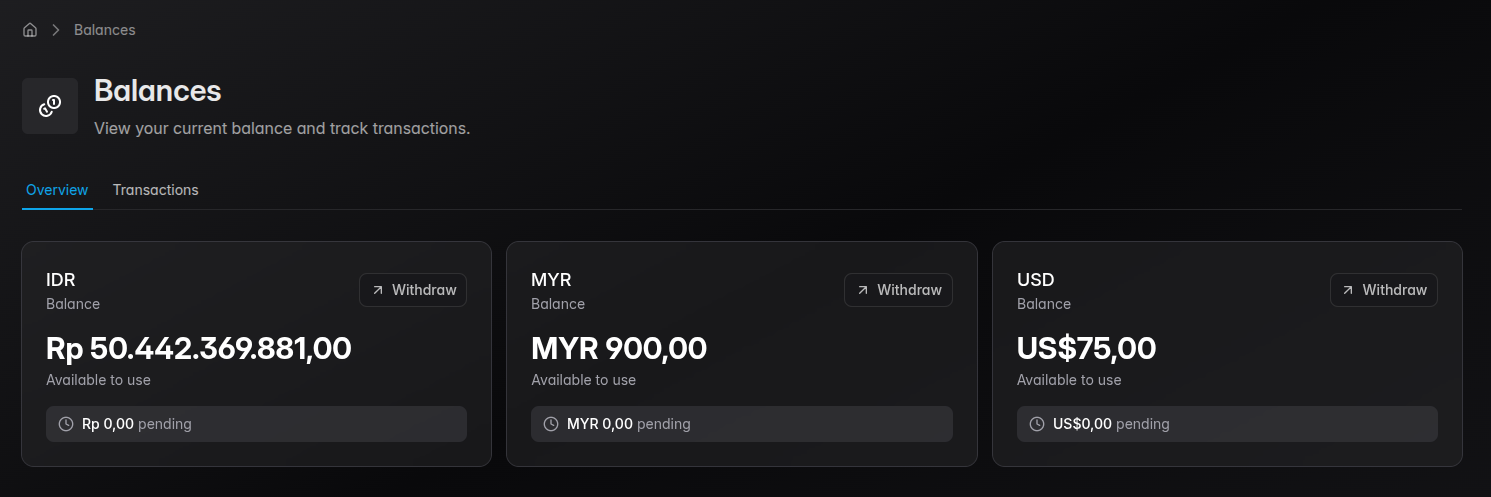
Each balance card displays the following information:
-
Available to use
The amount of funds currently available in your account for use. This is the amount you can withdraw or use for outgoing payments.
-
Pending
The amount of funds that are currently being processed and are not yet available to use. This typically includes incoming payments that have been received but have not yet been settled into your available balance.
Withdrawing funds
Each balance card has a Withdraw button that allows you to initiate a withdrawal for that currency directly from the Balances page. Withdrawals allow you to move funds from your account balance to a registered and verified bank account. For more details, see Withdrawal.