Webhook Secret
Every webhook request sent by KingsPay includes a cryptographic signature that you can use to verify that the request genuinely originated from KingsPay and has not been tampered with in transit. Validating this signature on your server is strongly recommended before processing any webhook payload.
How it works
When KingsPay delivers a webhook request to your endpoint, it attaches two headers to the request: a timestamp and a signature. The signature is generated by combining the timestamp with the raw request body, then signing the result using your webhook secret and HMAC-SHA256. Your server can reproduce this signature independently and compare it against the one provided in the header to confirm the request is legitimate.
Finding your webhook secret
Each webhook destination has its own unique secret that is used to sign outgoing requests. To find and copy your webhook secret, follow the steps below.
-
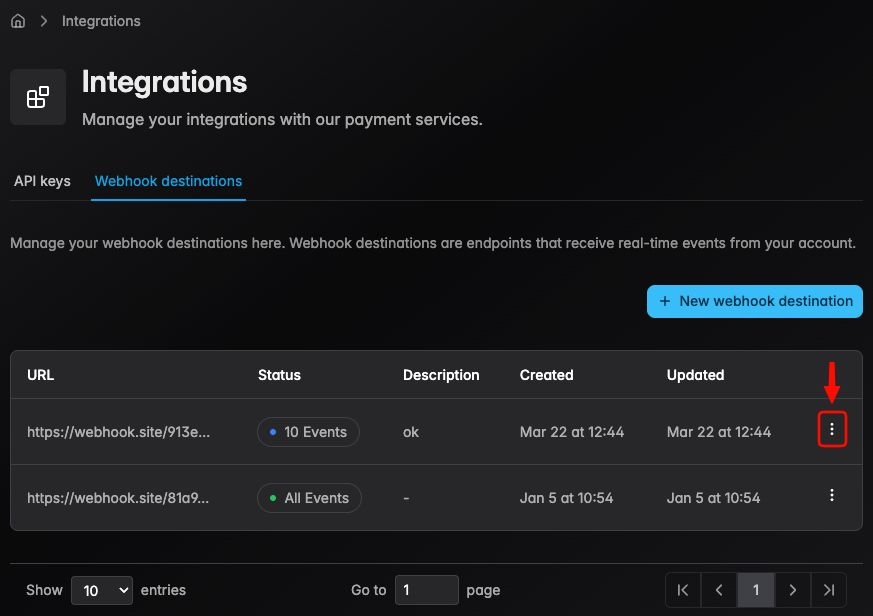
Navigate to the Webhook Destinations page under Integrations.
-
Locate the webhook destination you want to retrieve the secret for, and click the three-dot menu on the right side of the row.
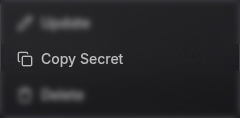
- A dropdown menu will appear. Click Copy Secret to copy the secret to your clipboard.
Your webhook secret is now ready to use in your integration.
Keep your webhook secret secure and never expose it in client-side code or public repositories. If your secret is ever compromised, you should delete the webhook destination and create a new one to obtain a fresh secret.
Next steps
For a full implementation guide including code examples, see Handling Events in the Integration Guides.