Creating an API Key
This page walks you through creating an API key for your business account.
Navigate to the API Keys page under Integrations and click Create new API key.
A drawer will appear to guide you through the setup process. Start by giving your API key a name to help you identify it later. This is especially useful if you plan to manage multiple API keys across different environments or services, as a clear name makes it much easier to tell them apart at a glance. The name is optional but recommended.
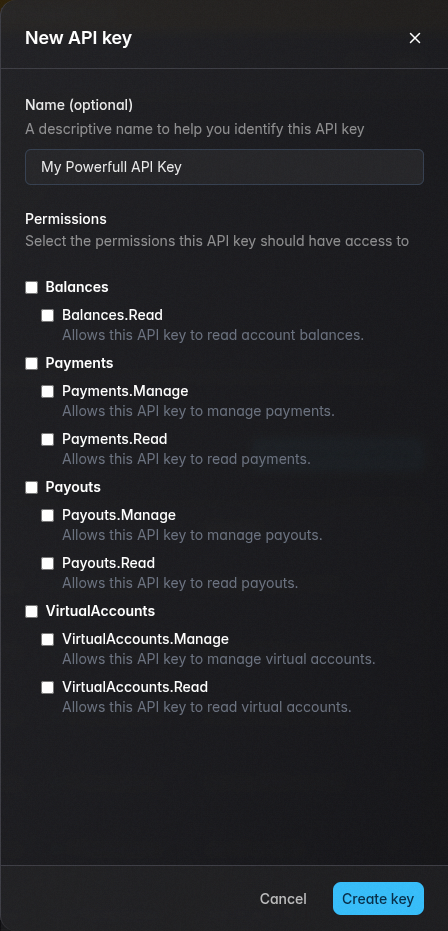
Next, select the permissions you want to grant to this API key. Permissions define what operations the key is authorized to perform against the API, giving you control over what each key can and cannot do. It is good practice to only grant the permissions that your integration actually needs, so that the impact of a compromised key is as limited as possible.
The following permissions are available:
-
Balances.Read
Allows this API key to read account balances. Use this permission for integrations that need to check or display balance information without performing any financial operations.
-
Payments.Manage
Allows this API key to create charges on behalf of your business account. Use this permission for integrations that need to initiate payment charges.
-
Payments.Read
Allows this API key to read charge data, including useful information such as charge status, charge ID, and other details about the charge object. Use this permission for integrations that need to retrieve or display charge information without performing any operations.
-
Payouts.Manage
Allows this API key to create payouts on behalf of your business account. Use this permission for integrations that need to initiate outgoing payout operations.
-
Payouts.Read
Allows this API key to read payout data, including useful information such as payout status, payout ID, and other details about the payout object. Use this permission for integrations that need to retrieve or monitor payout information without performing any operations.
-
VirtualAccounts.Manage
Allows this API key to create and delete virtual accounts on behalf of your business account. Use this permission for integrations that need to provision or remove virtual accounts.
-
VirtualAccounts.Read
Allows this API key to list and retrieve virtual account data. Use this permission for integrations that only need to read virtual account information without performing any operations.
Once you have configured the name and permissions, click Create API key to finalize. A modal will appear displaying your newly created API key. Click the copy icon to copy it to your clipboard.
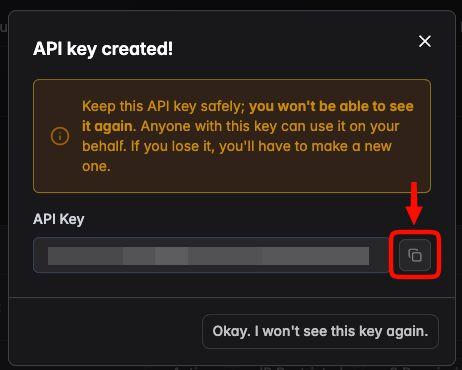
Make sure to copy and store your API key securely before closing this modal. For security reasons, the key will not be shown again once you dismiss it. For guidance on how to store your API key safely, see Best Practices.